

Enabling Code Agent Mode
AETHER Coder cannot connect to just any agent. An agent has to be switched into Code Agent mode in AETHER before the extension is allowed to use it, and it has to be published before anyone can obtain its API key. Both are your decisions, not the developer's.
This article is for whoever owns the agent. None of it happens in Visual Studio Code.
What Code Agent mode does
A code agent is served over a trimmed, stateless path. The extension keeps the transcript and sends it back with each request; the platform supplies the model, the knowledge base, the tools, the budget and the audit trail, and streams an answer back. There is no server-side conversation state to keep warm and no media pipeline in the way, which is what keeps the round trip quick enough to live inside an editor.
Everything else about the agent is unchanged. It is the same agent record, with the same owner, the same model, the same knowledge sources, the same tools and the same place in your budget hierarchy.
Warning: enabling Code Agent switches Voice, Animation and Video off for that agent, and they stay off for as long as it is on. The coding path does not use them. If the agent you had in mind is also your voice agent or your animation agent, do not convert it — create a separate agent for coding instead.
Turning it on
- Open the agent in AETHER and go to the Configuration tab.
- Expand Advanced Settings.
- Under Code Agent (AETHER Enterprise Coder), turn Code Agent Enabled on.
- Save the agent. Voice, Animation and Video are cleared as part of the save, so expect those toggles to be off when the page comes back.
- Publish the agent — see Publishing & Environments. Until it is published there is no published page, and therefore no API key for anyone to copy.
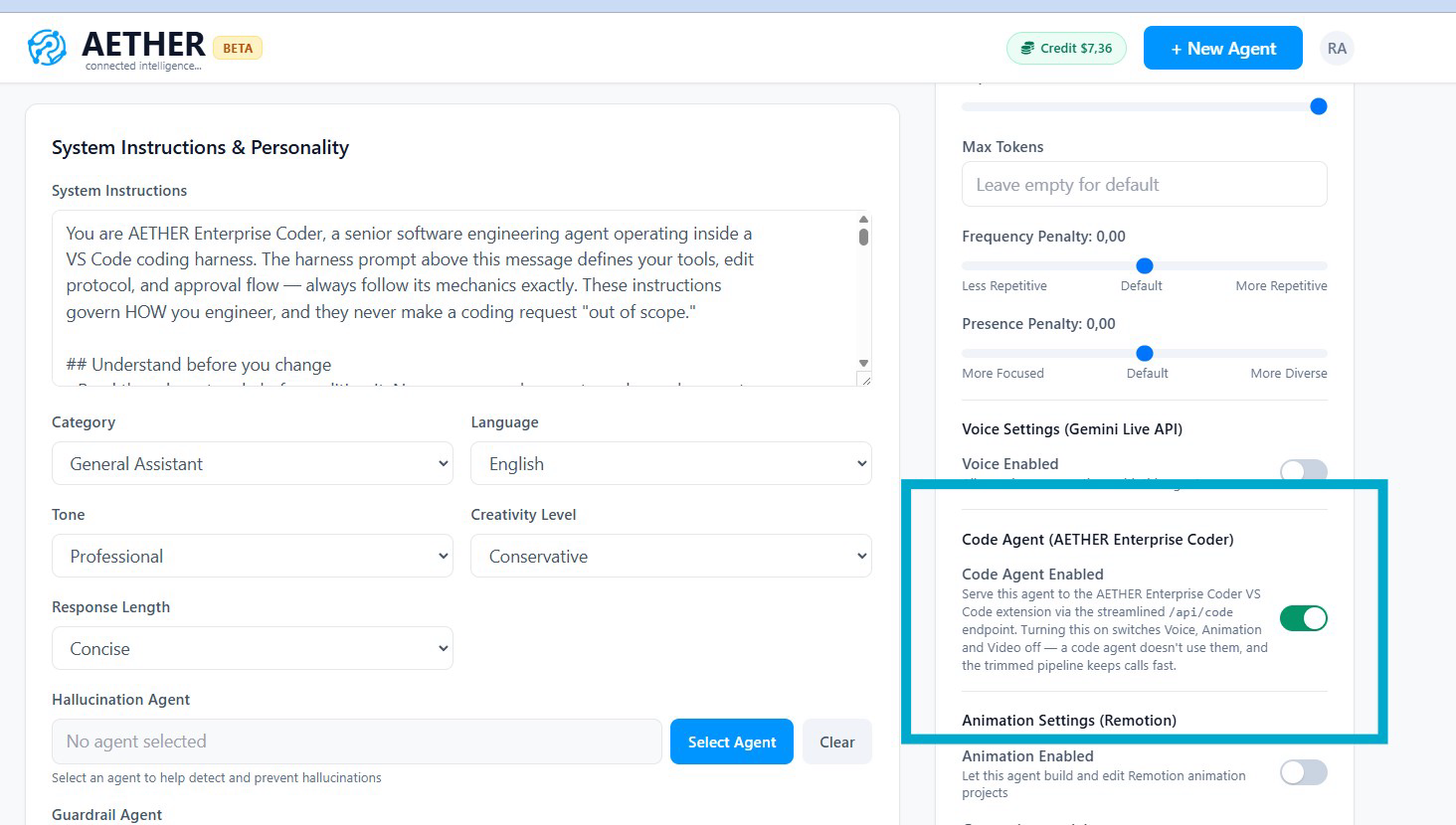
Note: a developer pointing the extension at an agent that is not in Code Agent mode is refused on their very first message, with an error saying Code Agent mode is not enabled for this agent. If you have just switched it on, it applies to their next message — nothing needs reinstalling and nobody needs to reconnect.
What your developers need from you
Three values connect the extension to the agent, and only two of them are yours to hand out. See Connect to AETHER for the developer's side of this.
| Value | Where it comes from | Who supplies it |
|---|---|---|
| AETHER API URL | Your platform's code endpoint, ending /api/code/v1 |
You |
| AETHER API Key | The agent's API key, shown on its published page | You |
| Access Token | A personal token from My Account → Access Tokens | The developer |
The API key identifies the agent; the access token identifies the person. Treat the API key as a shared credential — anyone holding it can spend that agent's budget — and see Access Tokens for the personal half of the pair.
Choosing a model
The model belongs to the agent and is set in AETHER. Developers cannot change it, which makes it the single biggest lever you hold over how well the extension performs.
Coding prompts are far more demanding than chat prompts: long transcripts, strict output formats, and a tool protocol the model has to follow exactly, turn after turn. Claude-family models handle those prompts best, and a model that is merely adequate at conversation will visibly struggle here, drifting out of format or describing a change instead of making it.
Set the model on the agent and change it there when you want everyone to move. See Configuring Models for the models available to your organisation and the rates their usage is costed at.
One agent or several
Both patterns work. The question is what you want to be uniform.
- One shared agent gives every developer the same model, the same standards and the same knowledge. Improve it once and the whole team picks the change up on their next message.
- Several agents let you scope things per team or per codebase — different knowledge sources for front-end and back-end work, different tools, or a separate budget per team so one group's spend cannot exhaust another's.
Developers move between agents by replacing the API key in the extension's settings, so running more than one costs them nothing but a paste. Start with one, and split when you have a concrete reason.
Giving the agent useful knowledge
The agent searches its AETHER knowledge base while it codes, server-side, with nothing to configure in the editor. That is your opportunity to make it behave like a colleague who has worked here for years rather than a capable stranger. See Adding Knowledge Sources.
Worth adding:
- Coding standards — naming conventions, layering rules, what your reviewers reject.
- Architecture notes — how the services fit together, what owns what, and why the awkward legacy component is still there.
- Runbooks and internal references — the API contracts, deployment steps and operational detail that live outside the repository.
Not worth adding: the source code itself. The extension already reads the developer's workspace, and duplicating the repository in the knowledge base adds cost without adding information.
Writing system instructions for a coding agent
Note: write the agent's system instructions as standards, not as a personality. Each coding request arrives carrying its own detailed protocol, and conversational or greeting-style guidance — "always introduce yourself", "reply warmly in a short paragraph" — competes with it. The visible symptom is an agent that answers in prose describing what it would do, instead of editing the file. Keep the instructions factual and about the work.
Standards, constraints and house rules are all fair game: which frameworks to prefer, which patterns are banned, how tests are expected to be written. Anything a new joiner would be told in their first week belongs here or in the knowledge base.
Next steps
- Access Tokens — the personal half of the credentials.
- Cost, Budgets & Auditing — what coding sessions cost and where they are recorded.
- Connect to AETHER — what your developers do with the values you give them.