

Configuring Models
The Models directory defines which AI models are available to agents and the rates used to cost their usage. It's an Organization-admin area.
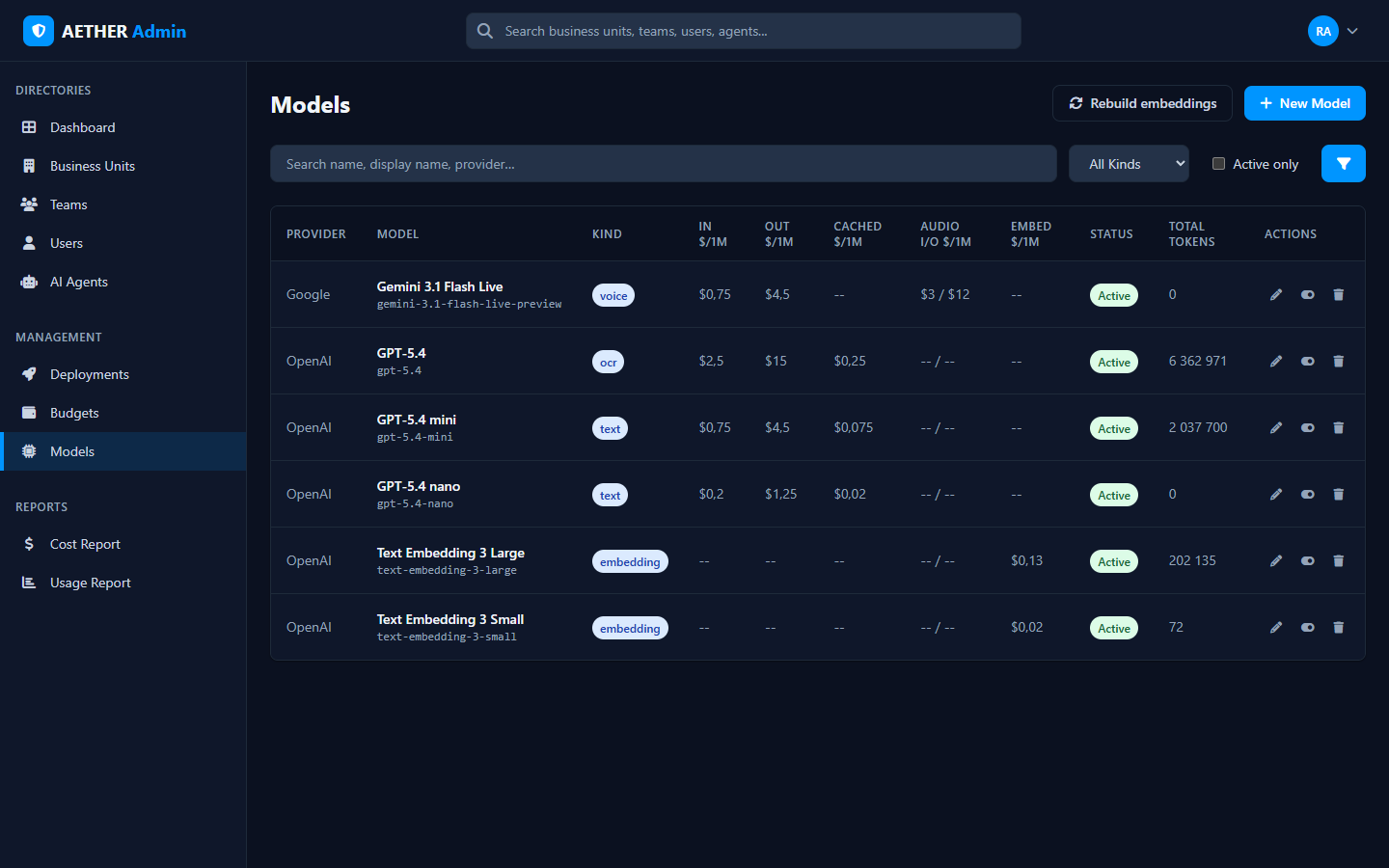
The directory
Each model row shows:
| Column | Meaning |
|---|---|
| Provider | The registry key, spelled exactly: OpenAI, Google, DeepSeek, ZAI, Bedrock, ... |
| Model | Display name and model id |
| Kind | What it's for: text, voice, ocr, embedding |
| In / Out / Cached / Audio / Embed $/1M | Per-million-token rates by modality |
| Status | Active or inactive |
| Total Tokens | Usage recorded against the model |
Search by name, display name or provider, filter by kind, or show active only.
Why rates matter
The per-model rates here are what the platform uses to turn token counts into the dollar figures you see throughout the cost report, per-agent analytics, and budgets. Keeping them accurate keeps your cost reporting trustworthy.
Managing models
- + New Model registers a model with its kind and rates.
- Edit updates a model's display name, rates or status.
- Rebuild embeddings regenerates the embedding index when you change the embedding model.
Note: Models are configured by Organization admins. The set of models you expose defines what agent builders across the org can choose from.
Next steps
- Cost Report — where these rates show up as spend.
- Usage Report — token and conversation volumes by model.