

AETHER Enterprise Coder

Your AI coding agent.
In VS Code.
Run by your enterprise.

AETHER Coder brings agent-driven coding to Visual Studio Code — planning, editing files, running commands and searching your organisation's knowledge — while your AETHER platform governs the models, budgets and access behind it.

See it in action

Ship code in VS Code. Account for it in AETHER.

Two halves of the same product — the agent your developers work with every day, and the dashboard your platform team runs it from.

The AETHER Coder panel in Visual Studio Code: a completed task explaining how dependencies are injected at startup, next to the Program.cs file it read.

AETHER Coder answering a question about a project's startup configuration — reading only the file it needed, then citing it. This session is running on gpt-5.3-codex, picked by the developer from the models their organisation has approved for this agent.

In the editor

It reads your project, plans, and shows its work.

Describe a task or just ask a question. The agent opens the files it needs, works through the change, and tells you exactly what it touched — without leaving the editor.

Context and cost, live. The meter above every task shows how much of the model's context window is in play and what the session has cost so far.

Every file it reads is cited. Named, linked and line-scoped, so you can check the answer instead of trusting it.

Plan first, then Act. Think a change through before a line moves — and set auto-approve rules for the steps you'd always say yes to.

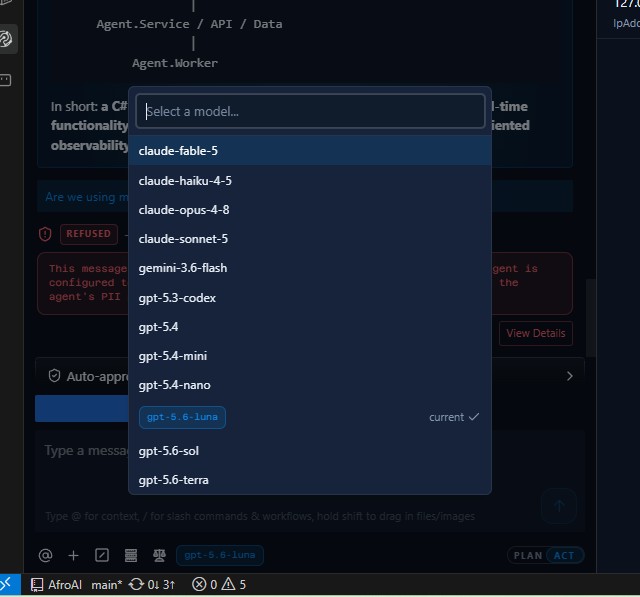
The model picker in AETHER Coder, listing eight selectable models including gpt-5.3-codex marked as current, with three further models greyed out and labelled Unavailable.

Eight approved models to choose between — and three greyed out as Unavailable because this organisation hasn't enabled them.

In the model picker

Your admin sets the menu. Your developers pick the model.

Every AETHER coding agent carries a catalogue of approved models. Developers switch between them as the task demands — something quick and cheap to explore a codebase, something heavier to finish the job — without an API key ever reaching their machine.

Switch without leaving the editor. Open the picker, choose a model, carry on — the one in play is marked as current.

Only what you've approved. Admins curate the catalogue in AETHER; anything the organisation hasn't enabled is visible but greyed out, never selectable.

Mix providers in one list. Claude, GPT and Gemini sit side by side — your platform handles the differences between them.

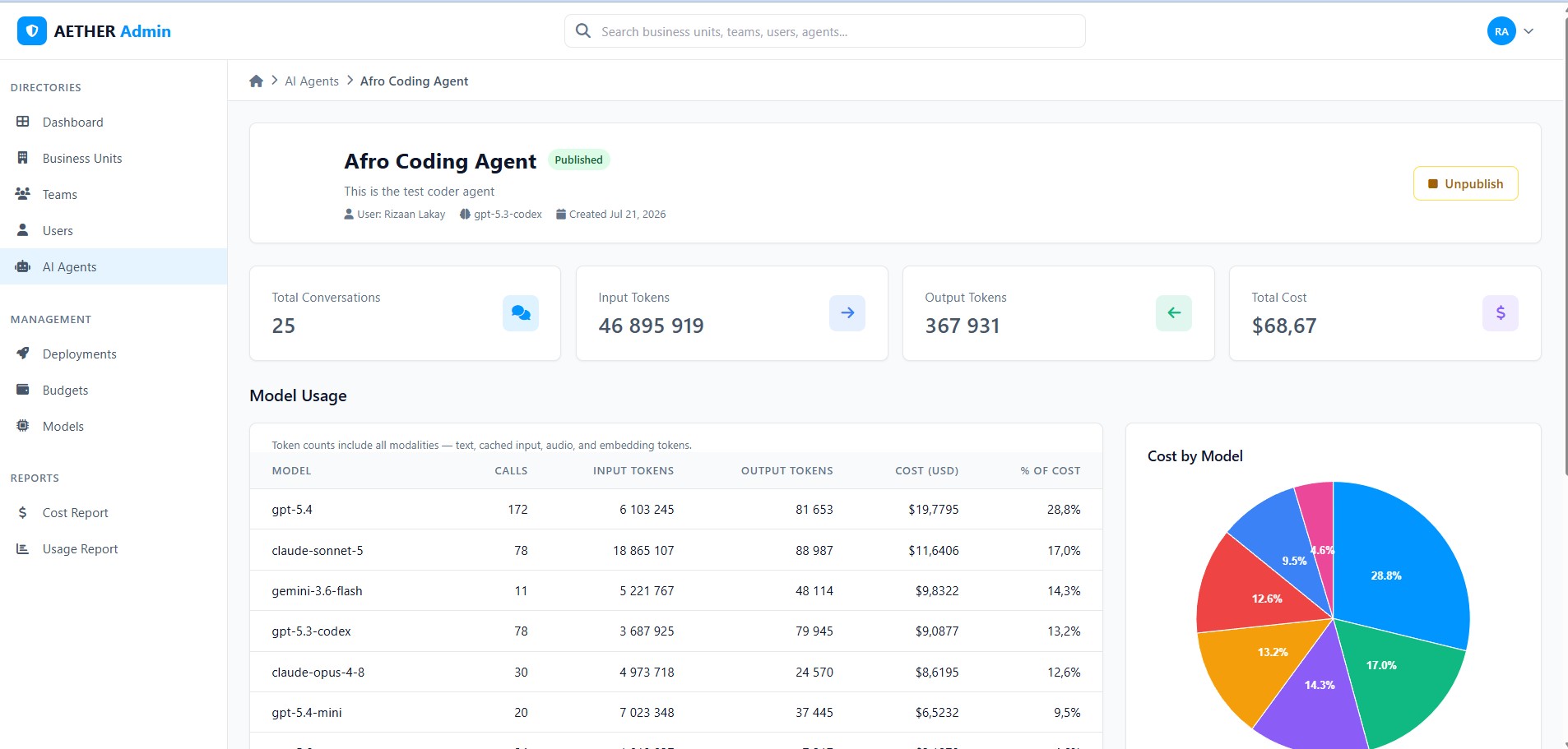
The AETHER Admin dashboard for a coding agent, showing total conversations, input and output tokens and total cost, above a per-model usage table and a Cost by Model pie chart.

The Model Usage view for a single coding agent — 25 sessions spread across seven models, with the pie chart showing exactly where the spend landed.

In the dashboard

Every model, call and cent — accounted for.

The same agent your developers use has a live usage page in AETHER Admin. Conversations, tokens and cost are broken down per model, so nothing about your coding spend is a guess.

Per-model breakdown. Calls, input and output tokens and cost for every model an agent touched — GPT, Claude and Gemini side by side.

Cost by model, at a glance. See which model is driving the bill before it becomes a line item you have to explain.

Counts you can reconcile. Cached input, audio and embedding tokens are all included, so the totals line up with what your providers bill.

Enterprise controls

Three things a coding plugin can’t do.

The extension is only the front end. These three live on your AETHER platform, which is why they hold on every machine, for every developer, from their next message — with nothing to install and nothing to opt into.

Remote Developer View

Scan the QR code in the panel and the same session opens in a browser. Watch a long task, approve a step or send the next instruction from your phone — while the files, the terminal and the edits stay on your machine.

How it works

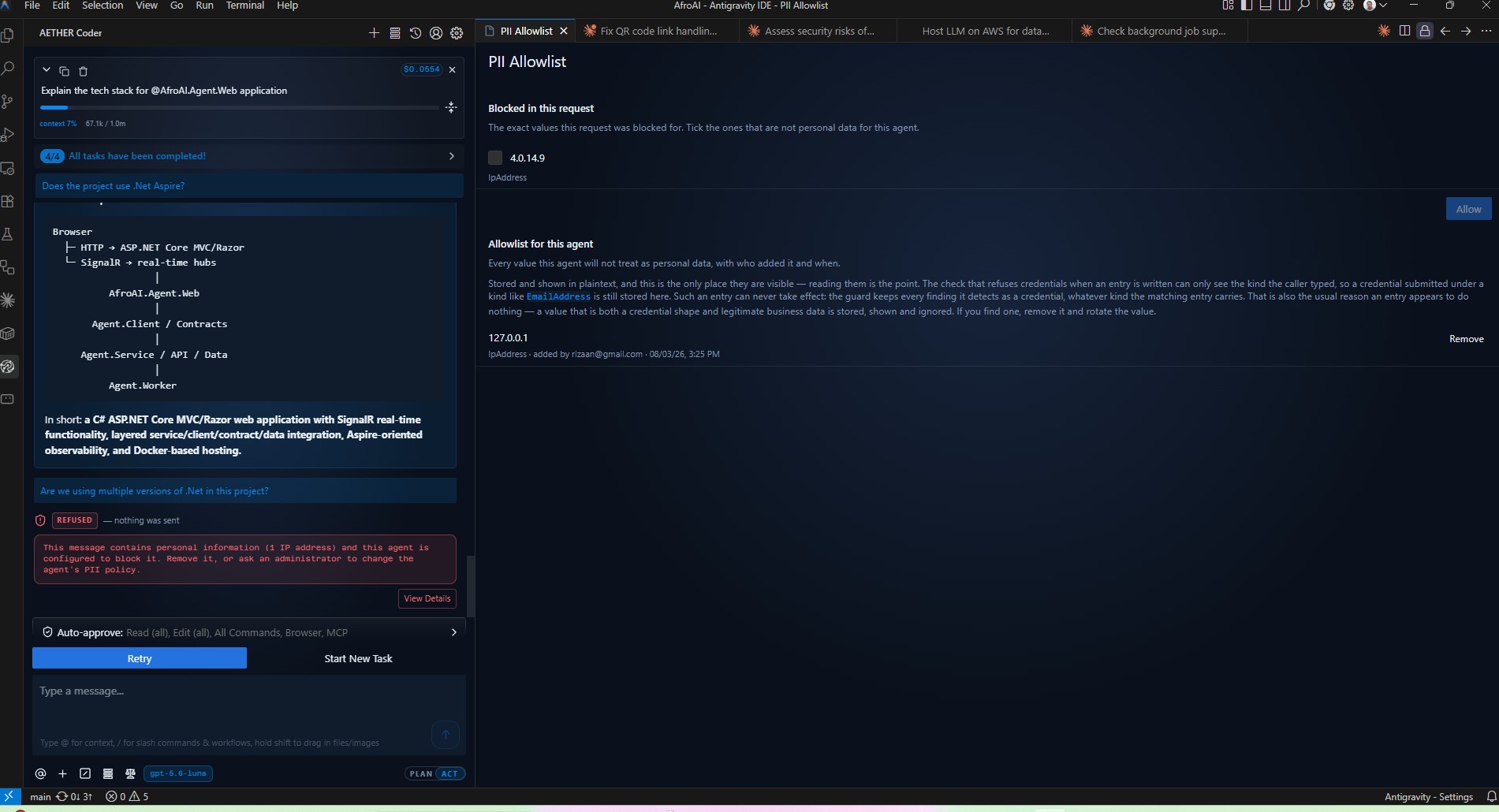
PII Guard

Every message is scanned on the platform before it reaches a model provider. Personal information is masked, removed or refused — your policy, set per agent, applied to what a developer types and to whatever the agent reads for itself.

Read the policy

Secrets Guard

API keys, access tokens and connection-string passwords get their own policy. Paste a live key and the message is refused outright — by default, with no written-reason override. One the agent reads from a file is stripped instead, so the task carries on.

Read the policy
Why AETHER Coder

Built for the enterprise, not just the editor.

Coding assistants are easy to adopt and hard to govern. AETHER Coder is different: the extension is the front end, and your AETHER platform is the brain — with all the control that implies.

Your models, governed

Platform admins approve which models an agent may use — GPT, Claude, Gemini or all three. Developers choose from that list per task, and never manage a key or a provider setting.

Grounded in your knowledge

While coding, the agent searches your AETHER knowledge base and calls your MCP tools server-side, so answers reflect your systems and standards.

Every session attributed

Personal access tokens tie every coding session to a person, and sessions are recorded in the Conversation Explorer for full auditability.

Full agentic coding

Plan and Act modes, file reads and edits, terminal commands and browser use — a complete coding agent inside VS Code.

Budgets & cost control

Organisation credits and per-agent budgets are enforced on every request, platform-side. No surprise bills.

Private by design

The extension talks only to your AETHER endpoint. Your code never goes to a third-party AI service.

PII Guard

Personal information is masked, removed or refused on the platform before any message reaches a model provider — set per agent, and applied to what the agent reads for itself as well as what a developer types.

Secrets Guard

Keys, tokens and connection-string passwords get their own policy. A live key a developer pastes is refused outright; one the agent reads from a file is stripped, so the task carries on without it.

Agent Skills

Import the skills your agent should have and every developer on it gets the same set, synced automatically and read-only in the editor. One reviewed way of working instead of a private folder per developer.

How it works

From install to first task in minutes.

1

Install the extension

Download the VSIX below and install it in VS Code — no marketplace account needed.

2

Connect to AETHER

Enter your AETHER API URL, your agent's API key, and your personal Access Token from My Account → Access Tokens.

3

Code with your agent

Open a project and describe the task. The agent needs Code Agent mode enabled under Advanced Settings in AETHER.

Get the extension

Get AETHER Coder for VS Code.

Install it from the Visual Studio Marketplace and VS Code keeps it up to date for you. Prefer to pin a build, or working without Marketplace access? Download the VSIX instead.

Install from the Marketplace

  1. Open the Extensions view in VS Code.
  2. Search for AETHER Enterprise Coder, check the publisher reads AI Explorers, and click Install.

Or from a terminal:

code --install-extension aiexplorers.aether-enterprise-coder

Installing the VSIX instead? Use the menu → Install from VSIX… and pick the downloaded file. See the install guide.

Bring your AI coder in-house.

Create an AETHER agent, enable Code Agent mode, and give your developers an AI coder your organisation actually controls.