

Secrets Guard
Secrets Guard is the credential half of the same check. Where PII Guard looks for personal information, this one looks for API keys, access tokens, private keys and connection-string passwords, and it has its own policy because the right answer for a leaked key is not the right answer for a customer's phone number.
It matters more in the editor than anywhere else on the platform. A coding agent reads
.env files, appsettings.json, shell history and terminal output as a matter of routine,
and any of those can carry a live credential towards a model provider.
Where it is configured
On the agent, directly below PII Guard in its settings, with its own toggle and its own Guard Type. Switching one guard off does not move the other. A new agent starts with Secrets Guard on and set to Block.
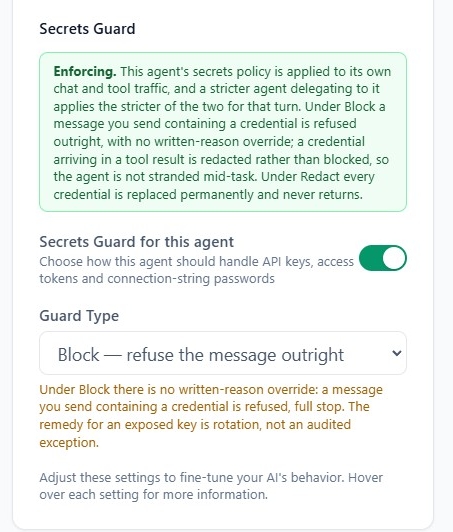
| Guard Type | What the model provider receives |
|---|---|
| Redact | A permanent marker. The credential is replaced and never returns. |
| Block | Nothing — a message you send containing a credential is refused outright. |
There is no Mask Out here, and that is deliberate. Masking is reversible: the real value would be put back into the reply, which is exactly what must not happen to a credential. The whole point is that it never round-trips through a third party at all.
The status notice above the setting reports whether the deployment is enforcing, in shadow mode, or off, in the same terms as the PII panel. In shadow mode credentials are detected and audited but nothing is redacted or refused; the policy you save starts applying by itself once enforcement is switched on.
Note: the two guards share a single scan. If either one is on, both categories are detected and audited — only the handling is governed by each guard's own policy. That is why an agent with PII Guard on and Secrets Guard off still shows credential findings in the audit trail.
What counts as a credential
| Platform and cloud | AETHER access tokens, AWS access key IDs, AWS secret access keys, Google API keys |
| AI providers | OpenAI API keys, Anthropic API keys |
| Developer services | GitHub tokens, GitLab tokens, Slack tokens, npm tokens, Stripe secret keys, SendGrid API keys |
| Generic | JSON Web Tokens, PEM private key blocks, connection-string passwords (Password=, Pwd=, AccountKey=, SharedAccessKey=, and scheme://user:secret@host URIs) |
Some patterns are recognised by their prefix alone; others need a keyword beside them to be called a credential, so that an ordinary 40-character hash is not mistaken for an AWS secret. Stripe's publishable key is deliberately not on the list — it is meant to be public.
Block, in the Coder
The same asymmetry as the PII guard, and it is what keeps a coding task workable:
- A credential in a message you typed is refused. The message is not sent.
- A credential in something the agent fetched — a
.envfile it read, a command's output, a tool result — is redacted, and the task carries on. Asking the agent to look at a config file does not strand it.
A refusal arrives as the same red card in the panel, and the sentence beneath the heading is what tells you which guard fired. For a credential it names the kind and adds the one instruction that matters:
…and this agent is configured to block it. Remove it before sending. If it was a real key, rotate it — it may already be in your shell history or this conversation's transcript.
Warning: there is no written-reason override for a credential, unlike a PII block on other surfaces. The remedy for an exposed key is rotation, not an audited exception — an approved exception would still mean the key reached a third party and now needs rotating anyway.
Nor can a credential be allowlisted. The guard refuses to let an allowlist entry suppress a finding it classifies as a secret, so there is no route to "just let this one through". See the allowlist for the one caveat to that — a mislabelled entry can still be stored, though it suppresses nothing.
If a key does get blocked
- Take it out of the message and send again. Point the agent at the file by name and let it read the file itself; tool-origin content is redacted rather than refused.
- Rotate the key if it was real. By the time the guard saw it, it had already been typed into an editor, and it may be in your shell history or in a saved transcript.
- Do not paste it somewhere the guard cannot see. Putting a live key into a rules file, a workflow or a committed config to get around a refusal moves the exposure, it does not remove it.
What is recorded
Every credential detection is audited, in shadow mode as well as under enforcement, and every refusal alongside it. The audit row carries the entity kind, the agent and the person — never the credential itself. See Cost, Budgets & Auditing and Activity Log.
Next steps
- PII Guard — the personal-information half, and the allowlist.
- Rules, Workflows & Slash Commands — where project instructions live, and why credentials do not belong in them.
- The Code API — the error a blocked message returns.