

Your First Task
This walkthrough takes you from an empty panel to a reviewed, working change. Follow it on a real project — ideally one under source control, with nothing uncommitted, so you can see exactly what the agent did.
Allow about ten minutes.
Before you start
- A project open in Visual Studio Code, in a folder you can safely change.
- A working connection to AETHER — see Connect to AETHER.
- Clean source control, so the diff at the end shows only the agent's work.
Step 1 — Open the panel and describe the task
Click the AETHER Coder icon in the activity bar to open the panel, then type your request into the message box and send it.
Describe the outcome, not the keystrokes. For example:
Add a health check endpoint that returns the app version, and a test for it.
That is enough. You do not need to name every file, and you do not need to explain the project structure — the agent reads the code to work that out.
Step 2 — Read the plan
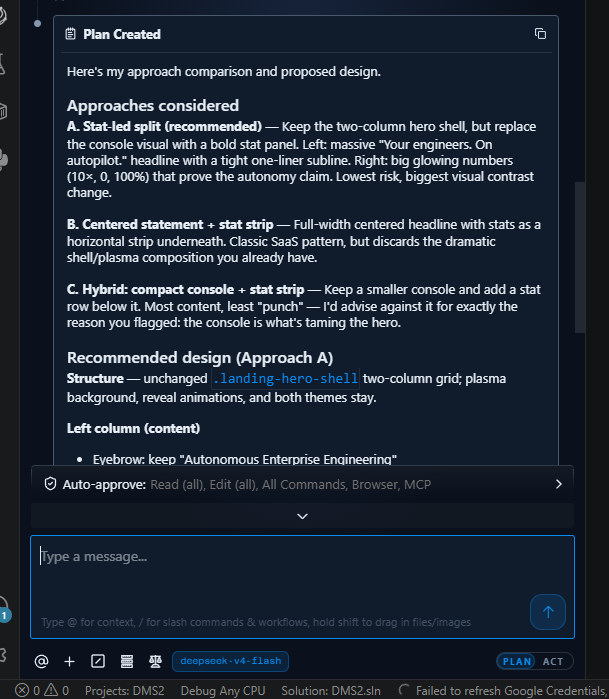
The agent starts in Plan mode. It opens the files it needs, looks at how the project is laid out, and comes back with a proposed approach: which files it intends to touch, what it will add, and anything it is unsure about.
Read it properly. This is the cheapest moment to change direction. If the plan is wrong,
reply in the same conversation — "use the existing HealthController instead of adding a
new one" — and the agent revises it. Ask questions too; in Plan mode it answers without
changing anything.
Step 3 — Switch to Act
When the plan looks right, switch the toggle in the message box from Plan to Act. The agent picks up the plan you just agreed and starts making changes.
You can switch back to Plan at any point if you want to rethink the approach. See Plan & Act Modes for how the two differ.
Step 4 — Review an edit
The first time the agent changes a file, a diff opens in the editor showing the old content beside the new. Nothing is written to disk until you decide.
- Save applies the change and lets the agent continue.
- Reject discards it. Tell the agent why, and it tries again.
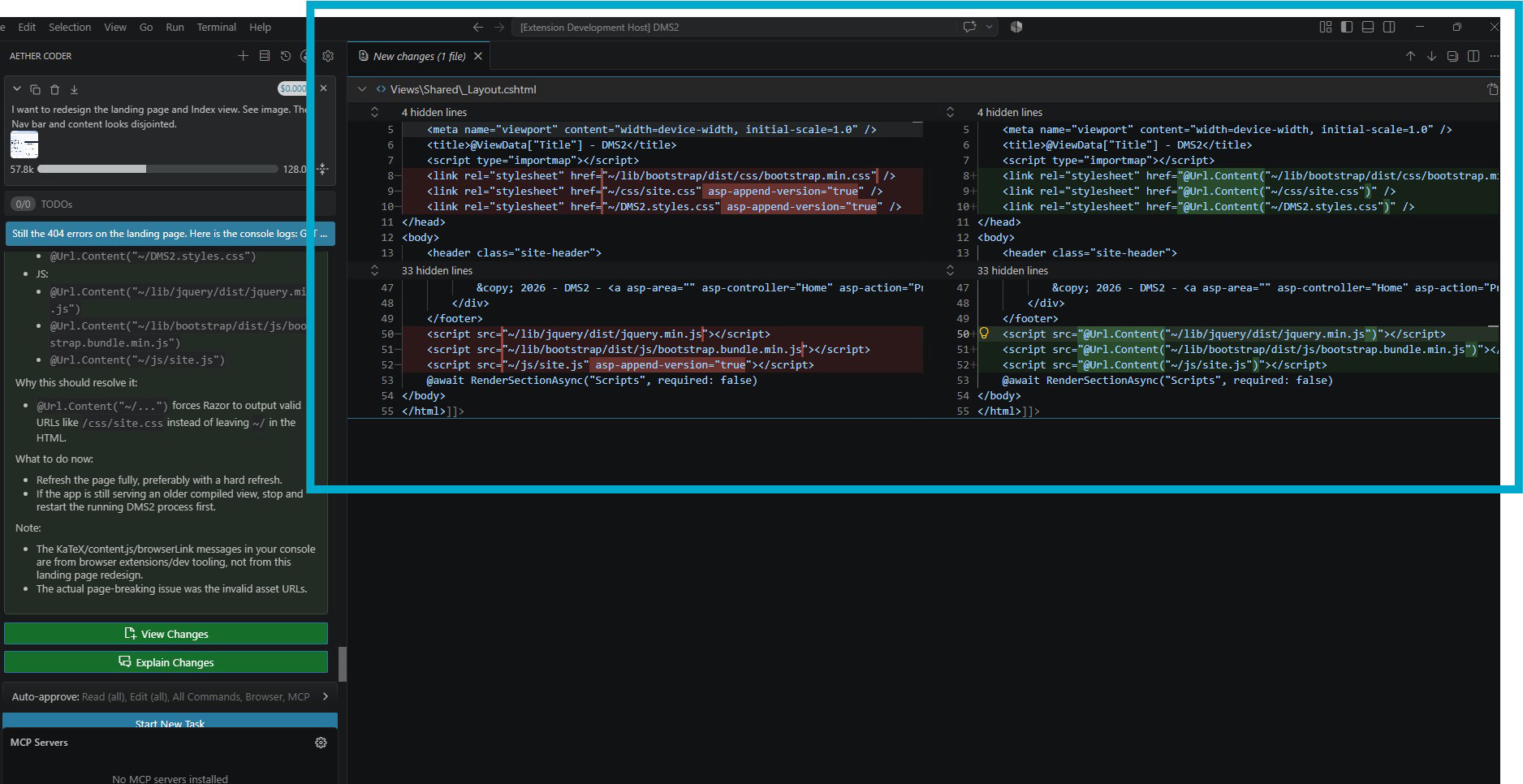
Read the first few diffs carefully — it is how you learn what this agent does well on your codebase. Once you trust a pattern, you can auto-approve it; see Running Commands & Auto-Approve.
Step 5 — Approve a command
To run the new test, the agent needs your terminal. It asks first, showing the exact command it wants to run.
- Run Command approves it and shows the output in the conversation.
- Reject refuses it; the agent carries on without that step.
- Proceed While Running appears for long-running commands — a watch build, a dev server — and lets the agent continue working while the command keeps running.
Read the command before approving. The agent is careful, but it is your machine and your terminal.
Step 6 — Completion
When the work is done, the agent summarises what it changed and why, file by file.
Do not take the summary on trust. Open the Source Control view and read the full diff yourself, then run the test suite. When you are happy, commit as you normally would — the agent does not commit for you.
If something goes wrong
If a task drifts — wrong approach, wrong files, a change you did not intend — you do not have to unpick it by hand. Each step of the task has a checkpoint behind it, and restoring one rolls your workspace back to that moment. Restore, reword the instruction, and run it again.
Checkpoints are separate from source control, which is the other reason to start from a clean working tree: your own uncommitted changes are much harder to tell apart from the agent's. See How the Agent Edits Your Code.
Tips for a good first task
- Scope it to one outcome. "Add a health check endpoint and a test" works well. "Refactor the service layer" does not.
- Name the files if you know them. It saves the agent an exploration round, which saves time and cost.
- Let it finish planning. Switching to Act while the agent is still exploring produces work based on half an understanding.
- Reject early rather than fixing later. A rejected diff with a one-line reason is faster than repairing a merged mistake.
- Start a new task for a new outcome. Long conversations carry old context that is no longer relevant, and cost more to run.
Next steps
- Plan & Act Modes — when to think and when to change things.
- How the Agent Edits Your Code — diffs, checkpoints and restores.
- Running Commands & Auto-Approve — decide what the agent may do unattended.