

Rules, Workflows & Slash Commands
Some instructions are worth repeating in every task — your naming conventions, your test framework, the things a new joiner would get wrong. Rules put them in front of the agent automatically. Workflows go a step further and turn a procedure you run often into a command you can invoke by name.
Rules
Rules are standing instructions the agent follows in every task in a project. AETHER
Coder reads them from a .clinerules/ folder at the root of your workspace. Each rule is
a markdown file, and you write it the way you would brief a new colleague.
my-project/
├── .clinerules/
│   ├── coding-standards.md
│   ├── testing.md
│   └── review-checklist.md
├── src/
└── README.md
One file per rule keeps them easy to read, easy to review and easy to remove when a convention changes. They are ordinary files in your repository, so they are versioned, diffed and reviewed like any other part of the project — which also means the whole team gets them without anyone configuring anything.
Rules worth writing:
- Coding standards. "Use constructor injection, never a service locator. Public
members get XML documentation comments. No
varfor primitives." - Testing conventions. "Tests use xUnit and FluentAssertions. One assertion concept
per test. Name tests
Method_Scenario_ExpectedResult." - Project conventions. "Database access goes through the repository layer. New
endpoints are registered in
Program.cs, not by attribute routing." - A review checklist. "Before you say a task is complete: the build passes, new code
has tests, and no
TODOcomments are left behind."
Keep them short and specific. A rule that says "write good code" costs context and changes nothing; a rule that names your test framework saves a wrong guess in every task.
Note: rules can also be managed centrally. Organisation-wide rules pushed by remote configuration appear in their own Enterprise Rules section, separate from the ones in your workspace. Your administrator maintains those, and you cannot edit them locally — which is the point: standards that must hold everywhere do not depend on each developer remembering to add a file.
Workflows
A workflow is a reusable procedure. Where a rule says how to work, a workflow says what to do, step by step, and you invoke it on demand.
Workflows live in .clinerules/workflows as markdown files, and each becomes a slash
command named after the file. release-checklist.md becomes /release-checklist.
Here is a small one. Save it as .clinerules/workflows/release-checklist.md:
# Release checklist

Run through this before we tag a release.

1. Run the full test suite and report any failures. Stop here if anything fails.
2. Check that the version number in the project file matches the version in the
   changelog heading.
3. List every commit since the previous tag, grouped into features, fixes and chores.
4. Draft the changelog entry from that list, in the style of the existing entries.
5. Tell me what you found and what you changed. Do not tag or push.
Now /release-checklist in the message box runs the whole thing. The value is not that
the agent could not have done those steps anyway — it is that the procedure is written
down once, is the same every time, and improves when someone edits the file rather than
when someone remembers a detail.
Good candidates are the procedures you would otherwise keep in a wiki page nobody opens: cutting a release, adding a new service, onboarding a module, running a security pass over a diff.
Built-in slash commands
Five commands are available in every project without any setup.
| Command | What it does |
|---|---|
/newtask |
Create a new task with context from the current task |
/deep-planning |
Create a comprehensive implementation plan before coding |
/smol |
Condenses your current context window |
/newrule |
Create a new rule based on your conversation |
/explain-changes |
Explain code changes between git refs |
Two of them deserve a habit.
/newrule is the easiest way to build up a rule set. When you find yourself correcting
the agent about the same convention for the third time, run /newrule and it drafts the
rule from the conversation you have just had. Read it, tidy it, commit it, and the
correction never needs making again.
/newtask carries the useful conclusions of the current task into a fresh one without
the transcript. Use it when the outcome changes rather than letting one task sprawl — see
Context: Mentions, Images & Focus.
The Rules & Workflows modal
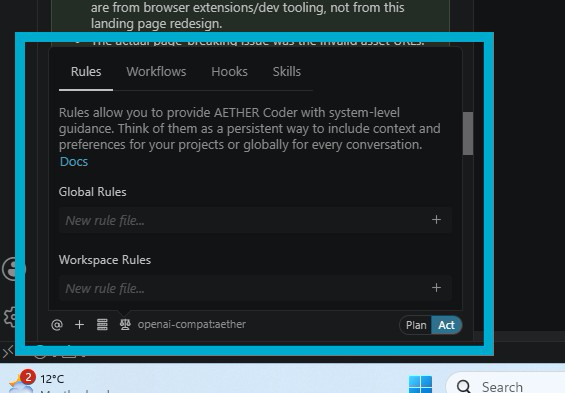
Everything above has a UI. Open the rules and workflows modal from the panel to see what is currently active, with four tabs:
| Tab | What it holds |
|---|---|
| Rules | The rule files in effect for this workspace, plus any Enterprise Rules from your organisation. |
| Workflows | The workflows available as slash commands, from .clinerules/workflows. |
| Hooks | Hooks defined for the project, in .clinerules/hooks. |
| Skills | Skills available to the agent, in .clinerules/skills — plus any Agent Skills your organisation has imported. |
The modal is the quickest way to answer "why did it do that?" — if a rule is switched on that you had forgotten about, this is where you see it.
Agent Skills
The Skills tab has one section you cannot edit. Agent Skills are imported against the agent in AETHER and synced to your machine automatically, so everyone using that agent works from the same set. They carry no toggle, no edit and no delete — the AETHER page is the control surface — and the section is hidden entirely if your agent has none.
They also take precedence over your own skills of the same name. When that happens the modal marks both rows, so you can see that your version is being overridden rather than wondering why it stopped applying. See Agent Skills.
Next steps
- Plan & Act Modes — where
/deep-planningfits. - Knowledge & Tools — the standing context your platform supplies.
- Settings Reference — every option in the panel's Settings view.