

PII Guard
PII Guard inspects everything an agent is about to send to a model provider and applies that agent's policy to any personal information it finds — masking it, removing it, or refusing the message outright.
It runs on the AETHER platform, not in the extension. There is nothing to install, nothing to configure in VS Code, and nothing a developer can switch off from the editor. The guard sits at the last point before the provider, which is why it sees more than your typed prompt: file contents the agent read, terminal output it captured and knowledge base results it retrieved are all in the request, and all scanned.
Credentials — API keys, tokens, connection-string passwords — are a separate control with its own policy. See Secrets Guard.
Where it is configured
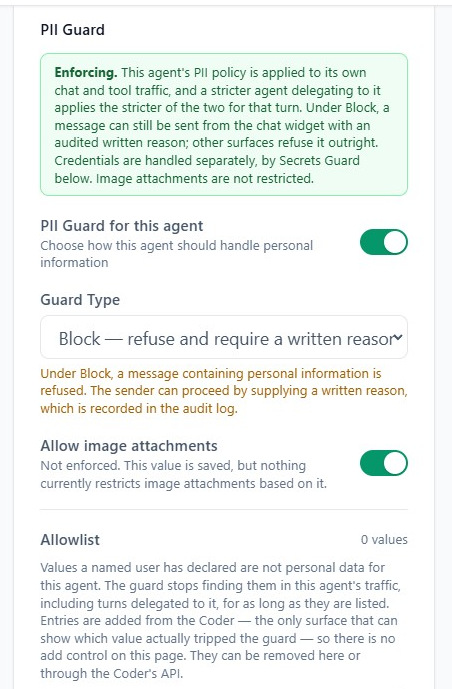
On the agent, in AETHER. Open the agent, scroll to PII Guard in its settings, and choose a Guard Type. The change applies to every developer using that agent from their next message; nobody reinstalls anything. See Agent Configuration.
| Guard Type | What the model provider receives |
|---|---|
| Mask Out | Placeholders instead of the real values, which are put back into the reply. The answer reads normally, and the values never leave your platform. |
| Redact | A permanent marker. The values are gone for good and do not come back in the reply. |
| Block | Nothing — the message is refused before it is sent. |
| Off (the toggle) | The text unchanged. Nothing is detected or altered for this agent's own traffic. |
The coloured notice at the top of the panel is worth reading before you rely on a setting. It reports whether this deployment is actually enforcing:
- Enforcing — the policy you choose is applied.
- Shadow mode — findings are detected and written to the audit trail, but nothing is masked, redacted or refused. The saved policy starts applying by itself the moment enforcement is switched on; there is nothing further to do here.
- Off — the guard is disabled platform-wide. Settings are saved and will apply if it is enabled.
- Status unavailable — the agent service could not be reached, so the page cannot confirm which of the above is true. Settings are still saved.
What it looks for
Five kinds of value are detected today:
| Kind | Notes |
|---|---|
| South African ID number | Checksum-validated, so a number-shaped string that is not a valid ID does not trip it. |
| Payment card number | Luhn-validated, for the same reason. |
| Email address | |
| Phone number | |
| IP address |
Two things it deliberately does not cover. Images are not inspected — a screenshot containing an ID document passes untouched, whatever the policy says. And credentials are not personal information: they are classified separately and handled by Secrets Guard, even though a single scan finds both.
Block, in the Coder
The rule that matters most day to day: Block applies only to content you wrote.
- Your own message is refused before the model ever sees it.
- Content the agent fetched itself — a file it read, a command's output, a knowledge base hit — is redacted instead, and the task continues. You are never stranded mid-task, and never asked to account for data the agent went and found on its own.
A refused message comes back as a red card in the panel:
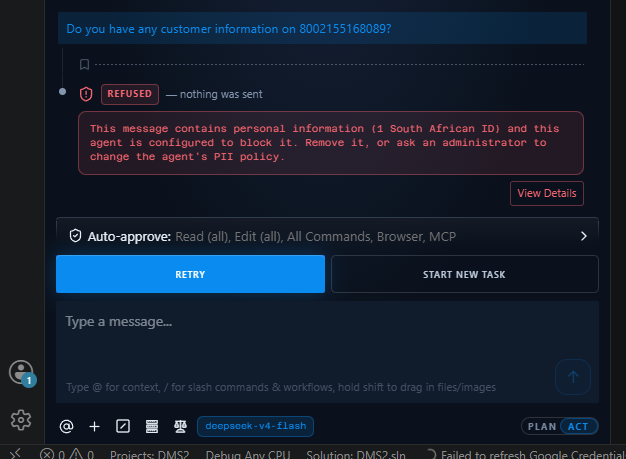
The sentence names the kind and how many were found — never the value itself, and never
where in the message it was. There is no retry button, deliberately: the decision is
determined by the text, so sending the same message again produces the same refusal. Because
the request never reached the model, it costs nothing; the task header shows $0.0000.
Elsewhere on the platform, a sender can push a blocked message through by writing a justification, which is recorded in the audit log. The Coder has no such override. From the editor a Block is final: edit the message to take the value out and send it again, or ask an administrator to change the agent's policy.
Tip: if a value is being flagged that is not personal data at all — a test fixture, a product code that looks like an ID, a shared support mailbox — that is what the allowlist is for. Ask for it to be allowlisted rather than working around the guard.
The allowlist
An allowlist entry is a named person's declaration that a specific value is not personal data for a specific agent. While it is listed, the guard stops finding that value in that agent's traffic, including turns another agent delegates to it.
| Scope | One agent. The same value must be listed again for another agent. |
| Matching | The exact value, case-insensitively. Not a pattern, not a prefix. |
| Size | Up to 500 entries per agent; each value up to 256 characters. |
| Attribution | Every entry records who added it and when. |
Entries are added through the Code API — POST /api/code/v1/allowlist with the same two
credentials the extension already sends. GET lists the agent's entries and
DELETE .../{id} removes one. See The Code API.
Review and removal happen on the agent's page in AETHER, where every entry is shown in full. That is what makes it the review surface, and it is why the page has no add control: only the Coder can show which value actually tripped the guard, so that is where an entry starts life.
Warning: an allowlist entry can never suppress a credential — the guard refuses to let one hide a finding it classifies as a secret. But a credential that was mislabelled when it was added is still stored, because the refusal at write time only sees the kind the caller typed. Such an entry suppresses nothing, which is also the usual reason a correct-looking entry appears to have no effect. Read the values on that page and remove anything that should never have been exempted.
What is recorded
Detections are audited whether or not anything was changed — including in shadow mode, which is how a deployment measures its real detection and false-positive rates before anyone is blocked. The audit trail records the entity kinds, the agent and the person, and never the detected value. Allowlist additions and removals are recorded the same way.
See Cost, Budgets & Auditing for what else a coding session records, and Activity Log for where administrators read it.
Next steps
- Secrets Guard — the same scan, applied to credentials.
- The Code API — the allowlist endpoints and the error the block returns.
- Cost, Budgets & Auditing — what a coding session records.