

Deployment Matrix
The Deployments area is where administrators see and manage which version of every agent is live in each environment. The Matrix tab is the headline view.
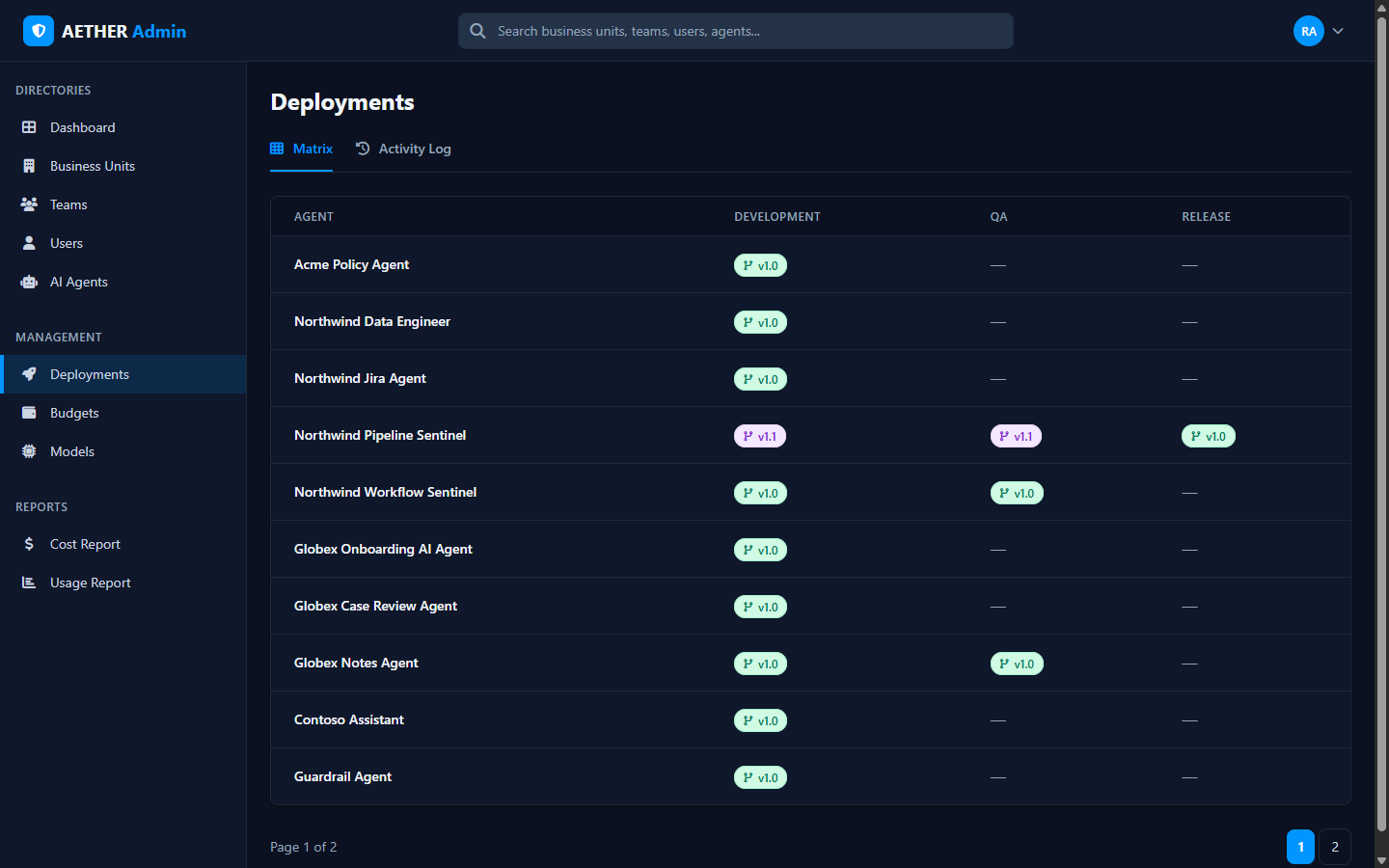
Reading the matrix
Each row is an agent; the columns are the three environments —
Development, QA, Release. A cell shows the version deployed there (for example
v1.0, v1.1) as a colour-coded badge, or a dash if nothing is deployed to that stage.
At a glance you can answer questions like:
- Which agents have reached Release, and at what version?
- What's sitting in QA waiting to be promoted?
- Where does Development differ from what's live?
Version badges are colour-coded per version so it's easy to spot when environments are out of step. The matrix paginates when there are many agents.
Acting on a version
Selecting an agent's version opens its version history, where you can review changes and roll back — see Version History & Rollback. Promotions (Development → QA → Release) are driven from the agent builder; the matrix is where you confirm the result and intervene if needed.
Scope
The matrix respects your admin level — you see the agents within your scope.
Next steps
- Version History & Rollback — inspect and revert versions.
- Activity Log — the audit trail of deployment events.